For my first post on Gaggimate 1.9 I worked through the list of pull requests and overlooked the actual text of the release notes. So here is everything that was missing, plus one correction, a look at what’s coming next, and the thing I left open last time: my Gaggia failed the pump calibration because of an OPV spring I swapped years ago.
The spring is the part I’d read if you only read one. The result surprised me.
Quick answer: check your OPV spring
If you fitted a tuning spring before you installed Gaggimate, check whether it’s still in there and put the original back. Gaggimate controls the pressure in software, so the weak spring only sends water back to the tank. On my machine it held the shot under the pressure the profile asked for, for months.
The biggest changes are the invisible ones
The display and the board in the machine talk to each other over Bluetooth all the time. In the first post I only mentioned the new protocol as a warning for the update. There’s a lot more behind it. The whole communication was rewritten, and so was the interface on the display. Those are two of the biggest rebuilds in this version, and you see almost nothing of either.
You notice the result. If a WiFi or Bluetooth connection drops, Gaggimate now reconnects more reliably. The display also feels much smoother since the update, and that’s the difference I notice most in daily use.
Three more things I missed:
- Pairing. Display and board are now paired and encrypted, so someone else’s display can’t simply connect to your machine. If you replace your display, start the machine with the steam switch on. It’s then ready for a new pairing for a short time.
- Info screen. The display has a new menu and an info screen that tells you how to reach the WiFi and the web interface. Last time I only mentioned the QR code for the hotspot. The info screen is handier when the machine is already on your network and you only need the address.
- Web interface on the phone. It was rebuilt for phones, with a new sidebar. Many options moved to their own settings page, so if you can’t find one after the update, look there.
Ramps by weight instead of time
This is the one I’m embarrassed about, because it’s right there in the code and I just missed it.
Profiles now control transitions more precisely, for example when the pressure rises from 3 to 9 bar. Until now, a transition like that always ran over a fixed time. From 1.9 on, the Ramp Target field in the profile editor also offers weight and pumped water. The pressure can then rise over the first 5 g in the cup instead of over the first 8 seconds.
That makes sense to me. If I grind finer, the first drops come later, but a transition by time carries on regardless. A transition by weight goes by what’s really in the cup.
For weight you need a Bluetooth scale. I compared two in Bookoo vs MyScale. Pumped water is something Gaggimate measures itself. My profiles go by grams almost all the time anyway, so this fits, but I haven’t tried it yet.
Gear pumps and rotary pumps
You need different hardware from mine for this one. 1.9 supports gear pumps and rotary pumps. You plug a small expansion board onto the Gaggimate board, the software detects it, and it then shows settings for tuning the pump.
Why I find that interesting: the vibration pump in a Gaggia runs in time with the mains and is regulated through individual pulses. A gear pump turns evenly and can be driven steplessly. The software also corrects for a little water slipping back inside the pump at high pressure.
Whether the conversion is worth it on a Gaggia, I can’t say. I don’t have a gear pump and I’m not planning one.
A correction: the pump while steaming
In the first post I said the pump is driven differently while steaming, with shorter but more frequent pulses. Nothing about that should have changed. The fix in 1.9 is only meant to make sure the pump always runs at 50 or 60 Hz and not by accident at 25 or 30.
So I looked at the code. Before, the frequency was always halved. Depending on what your board measures, that was either right, or your pump really did run at only 25 Hz. Since 1.9 it’s only halved when needed. If my board was one of those running too slowly, shorter and more frequent pulses are exactly what you’d expect.
I also compared the steam refill itself, which I went through in my morning coffee video. While you steam, Gaggimate pumps small amounts of water into the boiler so the steam doesn’t fade. The default is 0.4 ml per second with a limit of 2 bar, and that didn’t change with 1.9. On average the machine pumps the same amount. The milk texture didn’t change for me either.
Whether my board really was one of the slow ones, I don’t know. I never measured it. Honestly, some days I hear the difference and some days I don’t. Another viewer noticed something similar on the nightly, and the current nightly now logs which frequency the board detects, so someone is looking at this more closely.
What’s in the nightly
I don’t run the nightly, but I looked at what has been added since 1.9. None of this has a date, and all of it can still change before the next release.
- Live curve on the display. Instead of the progress bar you see pressure, flow, temperature, and weight during the shot, right at the machine with no phone next to it. This is the one I like most.
- Cleaning schedule. You set how often you want to backflush and descale, by days or by number of shots. When it’s due, the new warnings system tells you. Matching cleaning profiles are included.
- Stop by ratio. You can stop a shot at 1:2, for example, instead of setting a fixed number of grams.
- Translations. The web interface is already translated in the nightly, into German too.
- An app for iPhone and Android is in the works.
Among the open proposals on GitHub there’s also bean management: up to four beans, each with its own profile and grind setting, and on the display you only pick the bean. Whether that ever arrives is open. There are already plenty of apps for managing beans. Having it in the machine is a cool idea, but then it has to be done well.
Back to the original spring
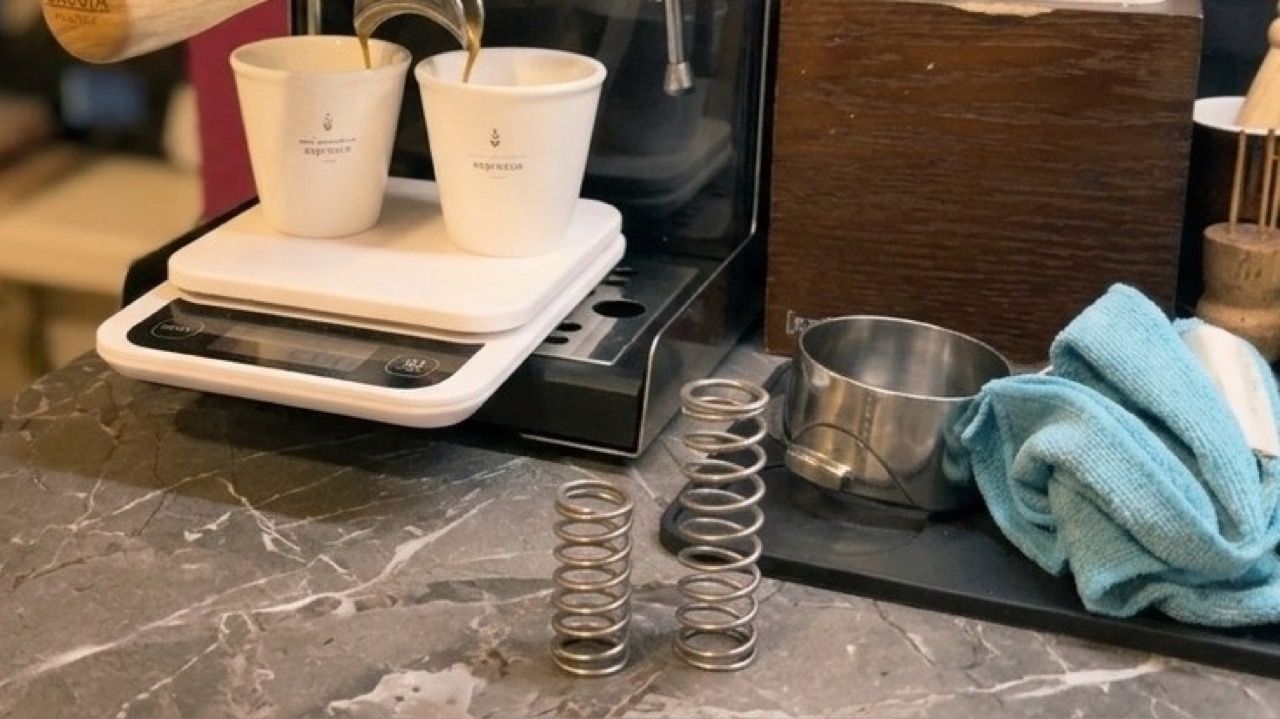
The swap itself was easy: open the valve, take the spring out, put the original in, close the valve. Afterwards it dripped at the fitting below, because there’s more pressure on the valve again. I had to tighten the clamp a little and then it was sealed.
With a blind basket the valve now opens at about 12 bar. With the tuning spring it was 8.8.
Why was the weaker spring a problem at all? Without Gaggimate, the Gaggia can’t regulate pressure. The pump just runs flat out. Back then, the tuning spring was the only way to limit the pressure to around 9 bar. With Gaggimate the software regulates the pressure, and the weaker spring only sent water back to the tank through the valve, water that should have gone through the coffee. A mod that once solved a problem had become the problem.
Then the calibration. The first attempt aborted again, and I don’t know why. The second ran through without problems and adjusted the values for my pump a little.
What changed in the cup and in the curves
I didn’t expect the espresso to change. I was wrong. The first shot with the original spring tasted a little more intense, more like a classic espresso. It was subtle, but it was there.
The curves show why. In the shot analyzer I overlaid the last shot with the old spring and the first with the new one, both on the same profile. It’s called Cremina Lever and asks for 9 bar.
| Tuning spring | Original spring | |
|---|---|---|
| Valve opens with a blind basket | 8.8 bar | about 12 bar |
| Pressure reached with Cremina Lever | just under 8 bar | 9 bar |
| Pump flow according to Gaggimate | about 6 ml/s | about 3 ml/s |
The rest went straight past the coffee and back into the tank. That also means my shots with this profile over the last months weren’t what the profile asked for. Gaggimate tried, and the spring stopped it. The pump was also running at close to full load for almost the whole time, and that’s extra strain on it.
This is one shot before and one after, on my machine. It isn’t a controlled test.
If you’re still deciding whether to update at all, start with the first post on 1.9. If you’re deciding on the mod itself, read my Gaggimate review after six months.